Text-wrangling with Vim
Feminist Linux Meetup Vienna
4th February 2026
This is the waiting queue slide. Hit space or right arrow key to jump to cover slide.
Text-wrangling with Vim
Feminist Linux Meetup Vienna, 4th February 2026

jackie / Andrea Ida Malkah Klaura <jackie@tantemalkah.at>
https://tantemalkah.at/2026/vim
 All contents, unless otherwise noted, were produced by Andrea Ida Malkah Klaura
under a Creative Commons Attribution - Share Alike 4.0 International License.
The feminist technoscience logo on the waiting queue slide is an adaptation of a public domain image.
content
- Text editor demos
- Short history & intro to vim
- workshopping:
- Vim Adventures
- VIM Tutor
- VimGolf
What are we talking about?
Text editor demos
- gedit
- nano
- vim
The origins of Vim
- Two-Bit History: Where Vim Came From
- Computer Things: Modal editing is a weird historical contingency we have through sheer happenstance
- Initial release: January 1992, by Bram Moolenar
- VIM for Vi IMproved originally: Vi IMitation
- Vi initial release: 1976, by Bill Joy
The origins of Vi
- ed : line editor (developed for teleprinters), 1973, Ken Thompson, AT&T Bell Labs
- one of first 3 key elements of Unix"
- cryptic ed commands only suitable for "immortals" (George Coulouris)
- em : "editor for mortals", based on ed code, 1976, George Coulouris
- en : Bill Joy and Chuck Haley, inspired by em
- ex : en extended, with added full-screen visual mode, Bill Joy 1976
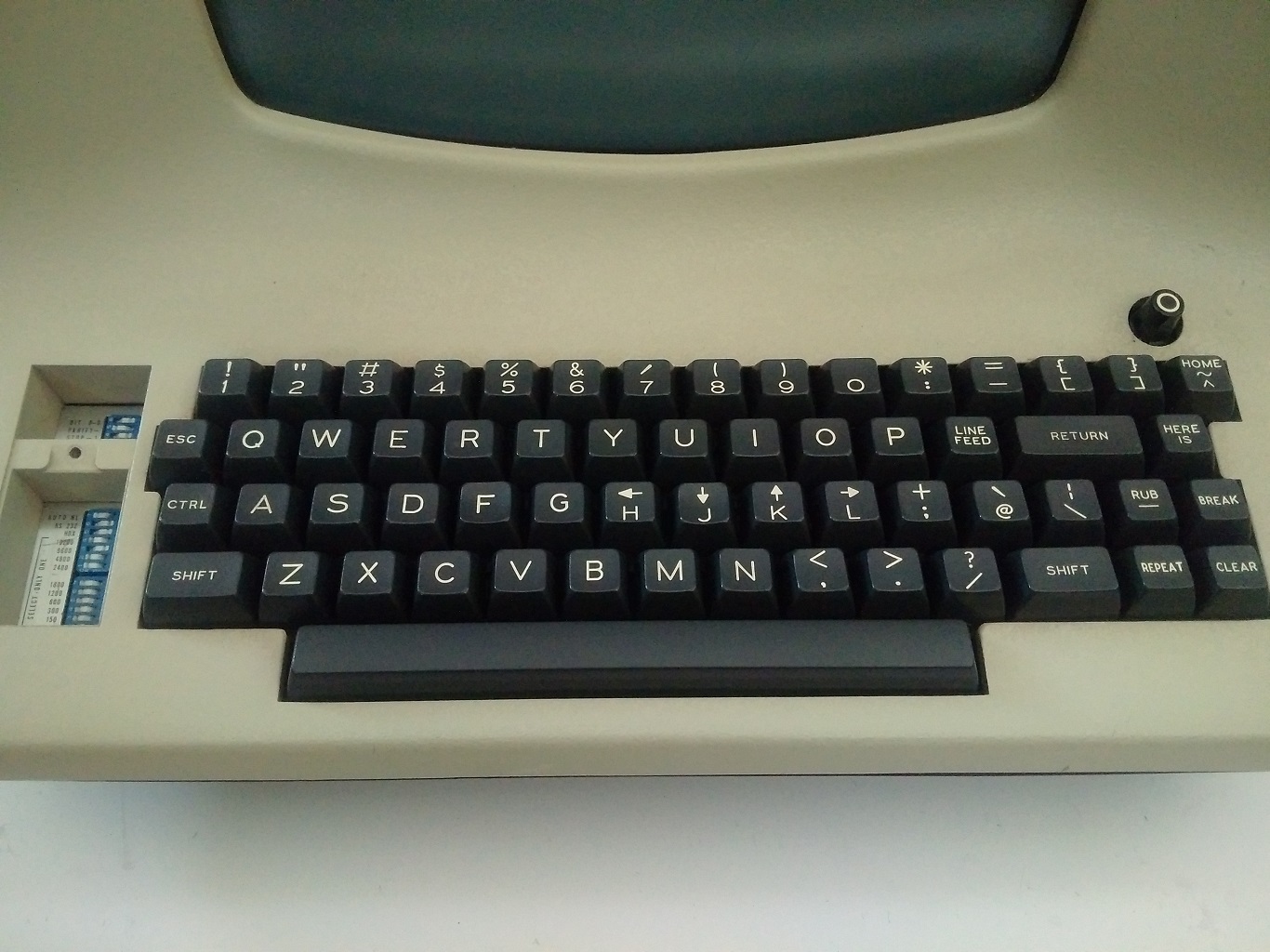
h, j, k, l ...
for moving around, seriously?
what about arrow keys?


or check out this photo of a LSI-ADM3A keyboard
Who actually uses Vim nowadays?!?
- "In 2018, it was voted the most popular editor amongst Linux Journal readers."
- "In 2015, the Stack Overflow developer survey found it to be the third most popular text editor"
- "and, in 2019, the fifth most popular development environment."
- all according to Wikipedia [en]: Vim (text editor)
The heck WHY?!?
how to transform 
to 
in 56 keystrokes?!? (Images: screenshots of a VimGolf challenge)
What about these modes?

Source: Wikipeda [en]: Vim (texteditor), image by harp, CC-BY-SA

- 14 modes (7 basic + 7 variants)
- most important, for starters:
- normal mode: the default mode accepting editor commands
- insert mode: editing content
VIM Adventures
VIM Tutor
Open up a terminal and type
vimtutor